


Admissions for Academic Year 2026 – 2027 are now open!
We are currently accepting applications for:
- Nursery – FS 1
- Nursery – FS 2
- Nursery – Reception
- Secondary – Year 12 (A Level)
Step by Step Instruction Guide for Online Application Using Applicaa
You will arrive at the landing page which will look like this:

You will need to start by creating your account. Click on the Create a parent account button.

You will be asked to enter your email address which will be the source of all communication.
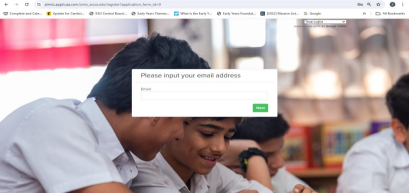
Once you enter your email and click on next, you will see this message, asking you to check for the confirmation token in your email
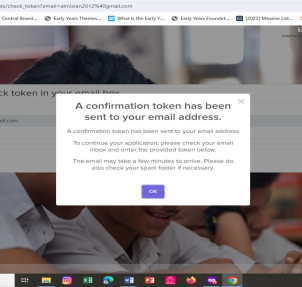
Check your email that you have used to submit to Applicaa for the confirmation token.

Enter the confirmation token on the applicaa portal as shown below:

Click on Next

Enter your password and confirm it (Your Full Name and Email will appear above as indicated)
Go back to the landing page and enter your email and password that you just set
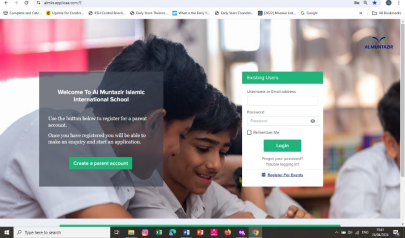
Once you enter your username and password, you will enter the Applicaa online portal.
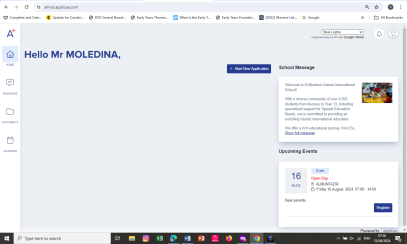
Click on Start New Application to begin your application and enter all relevant information.
You will be asked to enter the basic details of the child. Once you have done that, you will be able to continue filling the Application Form.
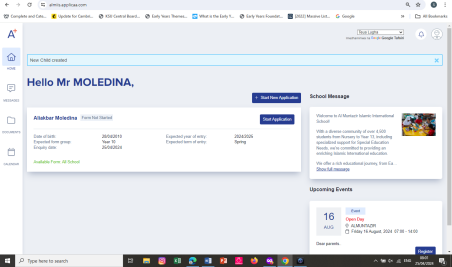
Follow the step by step onscreen guidance to fill the entire form, including signing off Declaration at the end of the form.
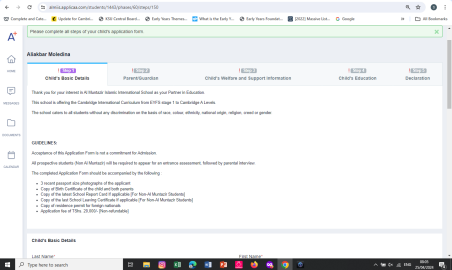
If, for some reason, you are interrupted while filling the form, you can always resume where you left off after logging in again through the landing page with your email and password (following the instruction from above).
After you have filled and submitted the form, you will need to print it out from your Portal:
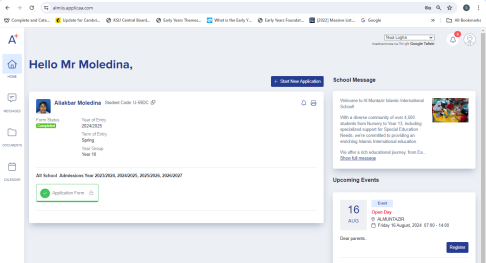
Print out the PDF version of your application and submit to the office together with the relevant documents as per the guidelines.
DO NOT HESITATE TO CONTACT US ON admissions@almuntazir.sc.tz for any guidance and support.